
Use the agent in Workspace
Use a file from Library to draft an answer and save it in your application.
Tools used: Applications · Workspace · Library
Before you start: Have an application with at least one question and a source file in Library. AI availability depends on your beta access and usage limits.
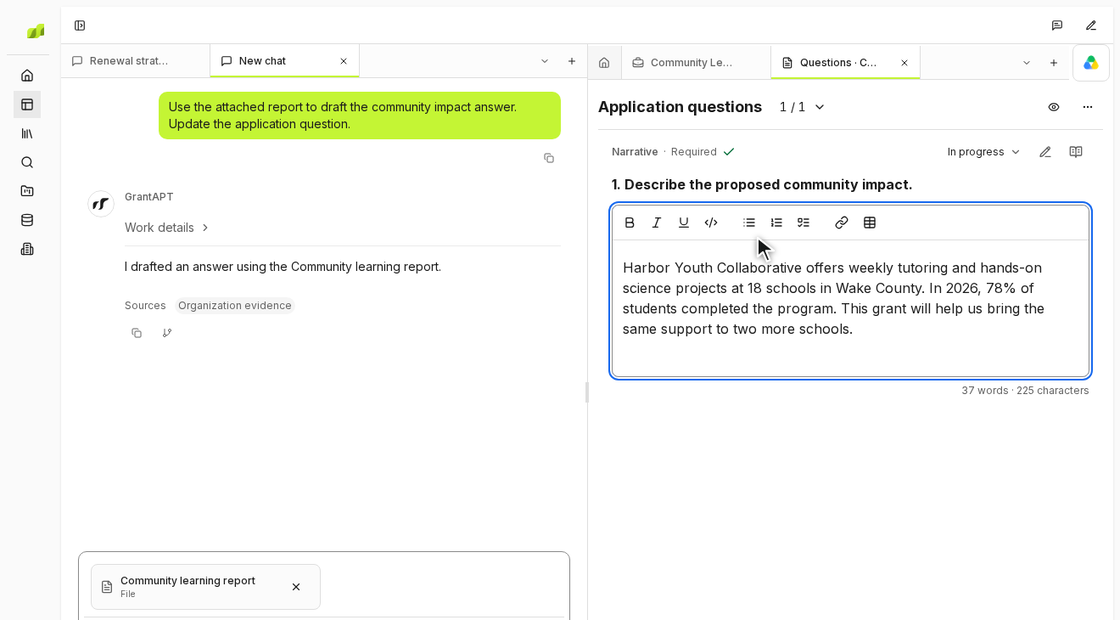
Open your application’s Questions document
In Applications, open the grant you’re working on. Select Open Questions document and find the question you want to answer. Use New chat to start a conversation beside it.
Attach a file for the answer
With the question open, choose Add to chat, then Reference workspace files. For a question about community impact, attach the report with your latest program results.
Draft and save the answer in your application
Name the question and tell the agent where to write the answer. For example, “Use the attached report to draft the community impact answer. Update the application question.” Include the funder’s word limit if there is one.
Select Review changes to open the proposed answer. Choose Accept all to save it, then Open source to return to the answer in Questions.