
Set up your organization
Add the organization details, program reports and budgets your team will need for applications.
Tools used: Organization · Profile · Sources
Before you start: You need an activated account in the correct organization. Contact support if you cannot access it.
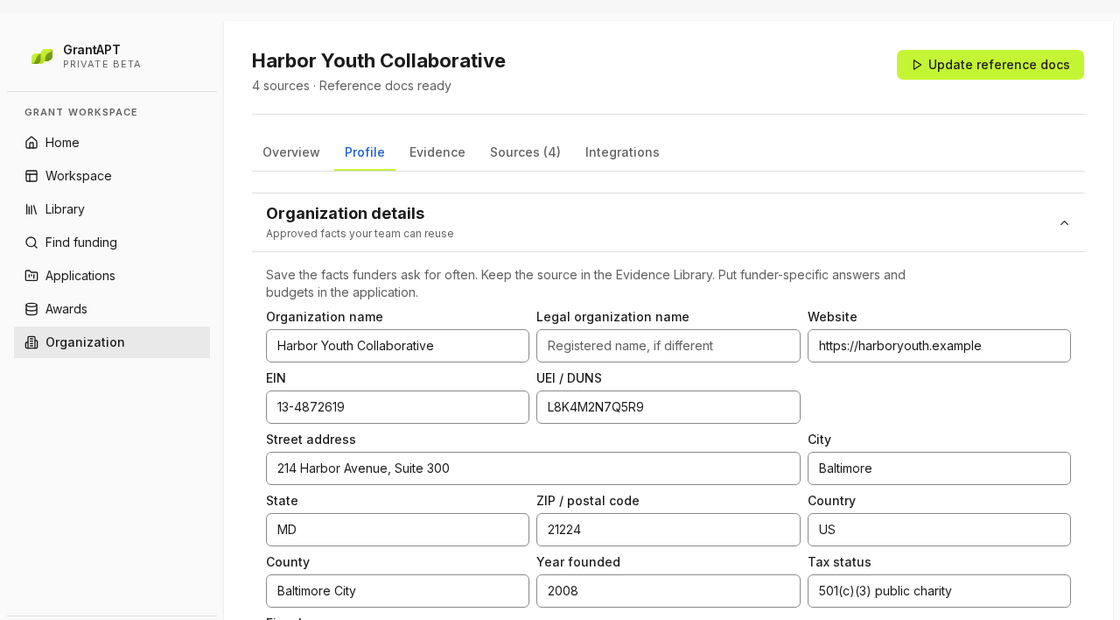
Open your organization profile
Choose Organization in the main navigation, then open Profile. If the wrong organization opens, contact support before adding files.
Save your organization’s details
Enter the legal name, address, website and EIN from your records. Add a contact person and choose Save details. If you don’t know the EIN, leave it blank until you can look it up.
Import your organization’s files
Open Sources and select Choose files to pick your current program overview, recent outcomes report and approved budget. Then select the button to add them. Use file names that include the program and reporting year.
Build your organization’s reference docs
Choose Build reference docs when the option is available. If you already have reference docs, choose Update reference docs.